
 AI Workforce


Ne laissez jamais un créneau inoccupé
La gestion automatisée des listes d'attente de Zenoti comble automatiquement les annulations de rendez-vous sans intervention de la réception. Les clients s'inscrivent facilement en ligne sur les listes d'attente et reçoivent des notifications instantanées dès qu'un créneau disponible se libère, ce qui se traduit par une augmentation des réservations, une réduction de la charge de travail du personnel et une amélioration de la satisfaction des clients.

Transformer les annulations en opportunités
Les annulations ne sont plus synonymes de perte de chiffre d'affaires. La fonctionnalité intelligente de liste d'attente de Zenoti permet aux clients de s'inscrire facilement sur une liste d'attente directement depuis votre Webstore votre application mobile. Dès qu'une annulation survient, Zenoti en informe immédiatement le client suivant, comblant ainsi automatiquement le créneau. Ce système proactif augmente votre chiffre d'affaires, optimise l'utilisation de vos créneaux horaires et libère votre réception des tâches manuelles.

Augmentation du chiffre d'affaires
Augmentez vos revenus mensuels jusqu'à environ 763 $ par site.

Gagner du temps pour le personnel
Offrez aux clients un libre-service fluide, tout en allégeant la charge de travail de la réception.

Une expérience client améliorée
Les notifications instantanées font le bonheur des clients en leur permettant d'accéder rapidement aux créneaux horaires de leur choix.
Une efficacité optimale
Comblez automatiquement les créneaux libres et optimisez votre planning.
Comment fonctionne la gestion automatisée des listes d'attente avec Zenoti
Les clients s'inscrivent sur la liste d'attente directement depuis votre Webstore votre application lorsque l'horaire de leur choix n'est pas disponible.
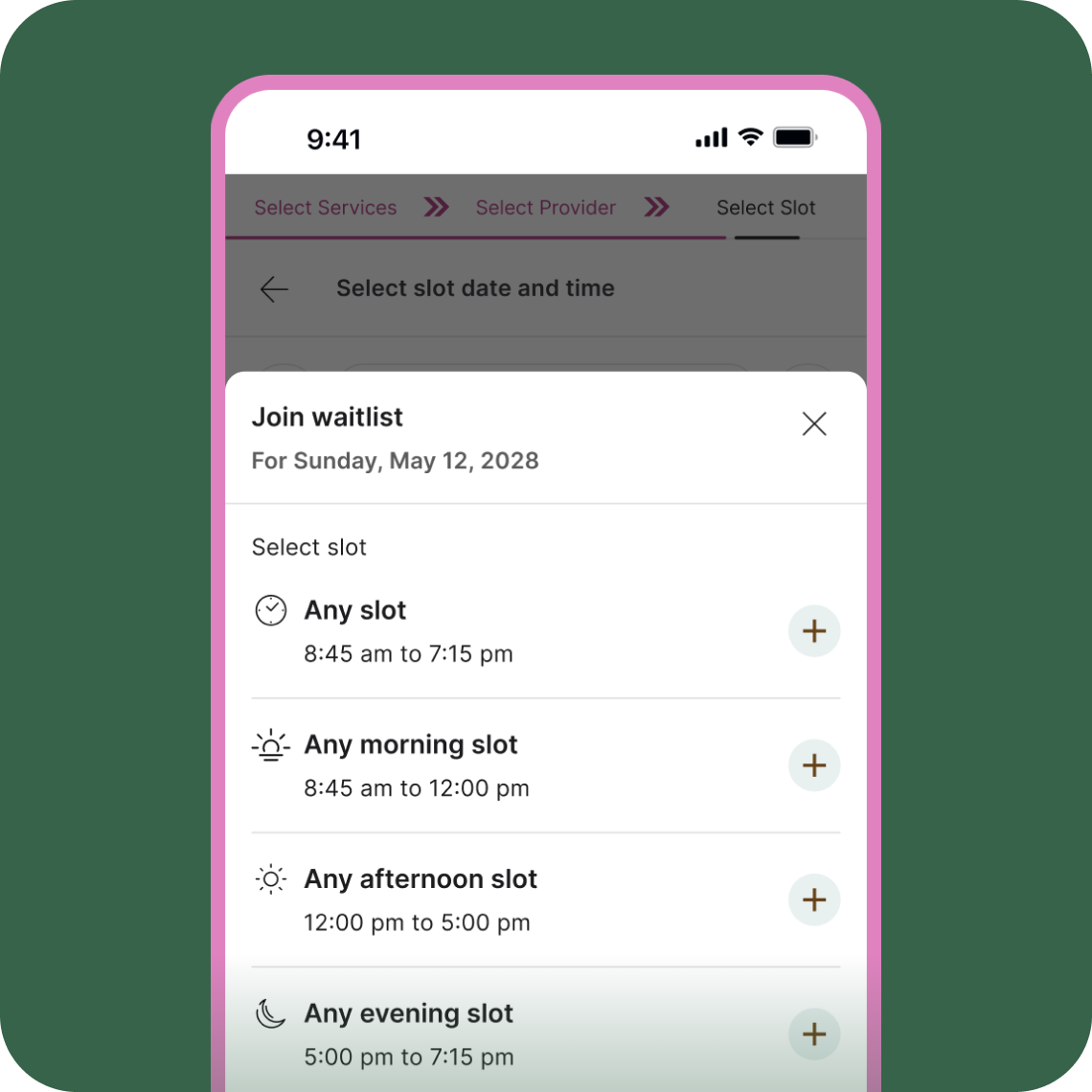
En cas d'annulation, Zenoti identifie immédiatement le prochain client disponible et envoie rapidement des notifications par e-mail et par SMS.
Les clients confirment leurs rendez-vous via des notifications envoyées pendant la plage horaire que vous avez définie. Si le premier client ne répond pas, le client suivant dans la file d'attente est automatiquement averti.
Des fonctionnalités puissantes pour un confort optimal
Un libre-service en toute simplicité
Les clients s'inscrivent eux-mêmes sur les listes d'attente via votre boutique en ligne ou votre application mobile, ce qui évite à votre équipe des étapes supplémentaires.
Notifications instantanées
Des alertes instantanées par SMS et e-mail, personnalisées à l'image de la marque, redirigent les clients vers une confirmation de réservation facile d'accès, ce qui renforce la satisfaction des utilisateurs.
Fenêtre de réponse personnalisable
Définissez le délai dont disposent les clients pour confirmer leurs réservations, afin d'optimiser le timing et l'efficacité dans l'occupation des créneaux horaires.
Synchronisation des rendez-vous en temps réel
Les créneaux confirmés apparaissent immédiatement dans votre agenda, ce qui permet de garantir l'exactitude et la mise à jour de votre calendrier.
Suivi performant et pertinent
Suivez les conversions issues des réservations en liste d'attente, y compris leur impact sur le chiffre d'affaires : plus de 18 000 conversions issues de la liste d'attente ont généré 780 000 dollars de chiffre d'affaires pour les utilisateurs de Zenoti rien qu'en 2024.

« L'utilisation de Zenoti a transformé mon entreprise. Les innovations récentes, telles que l'intégration de l'IA et les listes d'attente automatisées, m'aident à atteindre mes objectifs de développement personnel et à développer mes activités. »
Julie Schumacher
Propriétaire du salon Rumors
Une intégration en toute simplicité pour un impact maximal
La gestion automatisée des listes d'attente de Zenoti s'intègre parfaitement à votre Webstore, à votre application mobile client et à vos systèmes de gestion des rendez-vous. Les alertes sont envoyées via les fonctionnalités intégrées de SMS et d'e-mail, sans nécessiter de logiciel ni de matériel supplémentaire.

Des informations exclusives pour les marques de bien-être axées sur la croissance
Lire « The Check-In
Infographie : Conseils pour la vente de cartes-cadeaux | Les meilleures périodes et les meilleurs services pour stimuler les ventes par secteur d'activité
2 minutes de lecture
Enquête 2025 : ce que les clients attendent de l'IA dans les salons de coiffure et les spas
8 minutes de lecture
Élaborer des stratégies de marketing sur les réseaux sociaux 5 étoiles pour les marques de beauté et de bien-être – par des experts
7 minutes de lectureFAQ
Lors de la réservation en ligne, les clients voient s'afficher clairement l'invite « S'inscrire sur la liste d'attente » et peuvent sélectionner leur créneau préféré en toute simplicité.
Une fois le délai de réponse prédéfini écoulé, le système passe automatiquement au client suivant sur la liste.
Oui, le personnel peut facilement gérer, modifier ou prendre manuellement des rendez-vous directement depuis l'interface de prise de rendez-vous de Zenoti.
En comblant immédiatement les créneaux horaires annulés, vous récupérez systématiquement des revenus qui auraient pu être perdus, ce qui augmente considérablement vos revenus mensuels.
Non. Il suffit d'activer cette fonctionnalité dans les paramètres de Zenoti ; une fois activée, elle fonctionne automatiquement et efficacement.